
Imagine this: a streamer is in the middle of a high-stakes tournament broadcast, thousands of viewers watching every move, when suddenly their Magnetic Switches keyboard starts double-inputting or a key stops registering entirely. The chat erupts with confusion, the gameplay suffers, and what should have been a career-defining moment turns into a technical disaster. This scenario plays out more often than most people realize, and it highlights a fundamental problem with gaming keyboards—they wear out far too quickly under intense, daily use.
For gamers and content creators who rely on their equipment for hours every single day, keyboard failure isn’t just an inconvenience; it’s a threat to their livelihood. Traditional mechanical switches, while popular, are subject to physical degradation over time. Enter magnetic switches—a technology that’s redefining what durability means for gaming peripherals. By eliminating contact-based actuation and leveraging low-friction travel, these switches dramatically extend keyboard lifespan while maintaining the responsiveness that competitive gaming demands. In this article, we’ll explore how magnetic switches work, why keyboard customization matters for streamers, and how the combination of these features creates a truly long-lasting gaming keyboard built for the demands of modern content creation.
What Are Magnetic Switches and Why They Matter for Durability
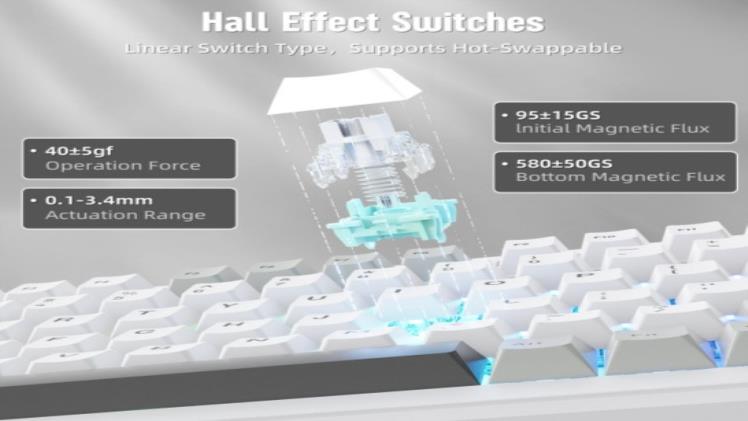
Magnetic switches, also known as Hall effect switches, use magnets and sensors to detect keystrokes rather than relying on physical metal contacts that traditional mechanical switches depend on. When you press a key equipped with a magnetic switch, a magnet moves closer to a Hall effect sensor on the circuit board, which registers the input based on changes in the magnetic field. There’s no metal-on-metal contact, no oxidation over time, and no physical mechanism that degrades with repeated use.
This contactless design is what makes magnetic switches a cornerstone of any truly durable gaming keyboard. Traditional switches eventually suffer from contact bounce, worn springs, and degraded leaf mechanisms—problems that lead to double-inputs, missed keystrokes, and inconsistent actuation. Magnetic switches sidestep these issues entirely. The low-friction travel inherent in their design means the key stem glides smoothly without the resistance caused by contact leaves scraping together, dramatically reducing the physical wear that accumulates over millions of keystrokes. For gamers who log eight or more hours daily—whether grinding ranked matches or streaming content—this translates to a keyboard that maintains its factory-fresh feel for years rather than months, making it a worthwhile investment for anyone who demands consistent, reliable performance from their equipment.
The Advantages of Magnetic Switches in Gaming Keyboards
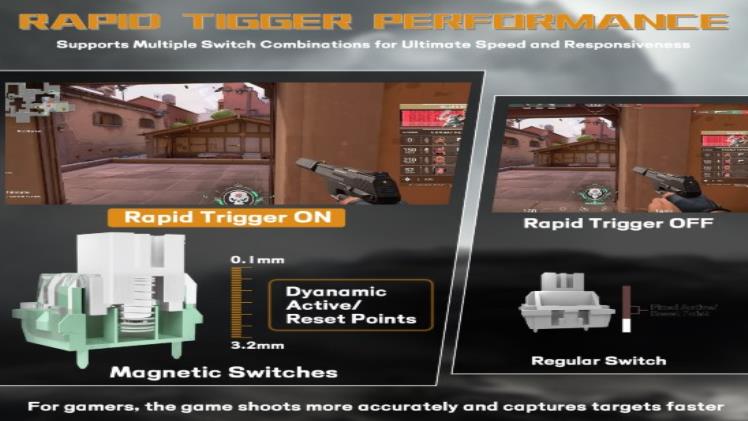
The benefits of magnetic switches extend well beyond simple durability. These switches deliver near-instantaneous response times because the Hall effect sensor reads the magnetic field continuously, meaning there’s no debounce delay—the brief waiting period traditional switches require to confirm a keystroke isn’t accidental. For competitive gamers, this translates to inputs registering one to two milliseconds faster, which can genuinely determine the outcome of a close firefight or clutch play. Additionally, magnetic switches offer adjustable actuation points, letting users set exactly how far a key must travel before it registers. A player might want a hair-trigger 0.2mm actuation for rapid-fire abilities but a deeper 3.5mm actuation for movement keys to prevent accidental inputs. This level of adaptability, combined with a rated lifespan often exceeding 100 million keystrokes, makes magnetic switches the most reliable option currently available for gaming keyboards built to last.
Low-Friction Travel Explained
Low-friction travel refers to how smoothly the key stem moves within the switch housing during a press. In traditional mechanical switches, a metal leaf or contact plate creates physical resistance at the actuation point, and this repeated scraping gradually wears down components. Magnetic switches eliminate this friction source entirely—the stem travels through its full stroke guided only by the spring and housing walls, with no lateral force from contact mechanisms. This results in a buttery-smooth keystroke that feels consistent from day one through year five, reducing finger fatigue during marathon sessions and preserving the switch’s internal components indefinitely.
Performance in Gaming Scenarios
In practice, magnetic switches shine during the most demanding gaming situations. During a fast-paced battle royale where you’re rapidly switching between building, shooting, and movement commands, the consistent actuation ensures every input lands exactly when intended. Streamers who play rhythm games or fighting titles—genres requiring frame-perfect inputs—report noticeably fewer missed commands compared to worn traditional switches. Because there’s no degradation curve, a magnetic switch keyboard performs identically on stream number one thousand as it did on stream number one.
Customizing Your Keyboard for Streaming Success
For streamers, a keyboard isn’t just an input device—it’s a production tool that needs to integrate seamlessly with complex broadcasting setups. Keyboard customization allows content creators to trigger scene changes, activate sound effects, launch subscriber alerts, and manage chat interactions without ever taking their hands off the keys or breaking gameplay flow. This is where features like dedicated macro keys, programmable layers, and per-key RGB lighting become essential rather than decorative. A streamer might assign one key to switch OBS scenes, another to mute their microphone, and a third to trigger a celebration animation when they hit a milestone—all while maintaining full gaming functionality on the primary key layer.
Magnetic switches play a crucial supporting role in this customization ecosystem. Because their actuation is consistent and predictable over the entire lifespan of the keyboard, streamers can trust that their carefully configured macros and hotkeys will fire reliably every single time. There’s no gradual drift in actuation force or point that might cause a macro to misfire during a critical broadcast moment. Software profiles allow creators to swap entire keyboard configurations between games or streaming segments instantly—a competitive profile for ranked play, a content profile loaded with entertainment triggers, and a productivity profile for editing VODs afterward. The combination of magnetic switch reliability and deep software customization means streamers can build increasingly complex workflows on their keyboard without worrying that the hardware will become the weak link in their setup.
Step-by-Step Guide to Setting Up Your Durable Gaming Keyboard
Step 1: Choosing a Keyboard with Magnetic Switches
Start by identifying keyboards that specifically use Hall effect magnetic switches rather than traditional mechanical options. Brands like MAMBASNAKE and others in the gaming peripherals space now offer models featuring this technology at various price points. Look for models that advertise adjustable actuation points, as this confirms genuine magnetic switch technology. Prioritize boards with hot-swappable magnetic switches if you want future flexibility. Check that the keyboard offers onboard memory for storing profiles, full N-key rollover, and a polling rate of at least 1000Hz. Read community reviews from other streamers and competitive players to gauge real-world durability experiences over extended use periods.
Step 2: Installing and Configuring Customization Software
Once your keyboard arrives, download the manufacturer’s configuration software from their official website. After installation, connect your keyboard and allow the software to detect it. Begin by setting your preferred actuation depths for different key zones—shallow for combat keys, deeper for less critical bindings. Next, create dedicated macro keys for your streaming workflow: assign OBS scene switches, audio toggles, and alert triggers to accessible positions. Save these configurations as distinct profiles you can switch between seamlessly during broadcasts.
Step 3: Optimizing for Live Streaming
Before going live, run a testing session where you simulate your typical stream activities. Verify that every macro fires correctly and that actuation points feel natural during actual gameplay. Set up dedicated hotkeys for subscriber alerts, sound effects, and chat interactions on a secondary layer so they don’t interfere with gaming inputs. Test your keyboard’s response under load by running your streaming software, game, and chat tools simultaneously to confirm there’s no input lag or missed keystrokes when system resources are taxed.
Step 4: Maintenance and Troubleshooting
If a key ever feels inconsistent, recalibrate the magnetic sensors through your software’s built-in calibration tool. Periodically update your keyboard’s firmware to benefit from performance improvements. Keep a backup of your profiles exported to your computer in case you need to reset the board or transition to a replacement unit quickly.
Ensuring Longevity: Maintenance Tips for Your Keyboard
Even though magnetic switches dramatically reduce the internal wear that plagues traditional keyboards, the external components still benefit from regular care. Dust and debris can accumulate between keycaps and affect the smoothness of key travel over time, so a weekly routine of turning your keyboard upside down and gently tapping out loose particles goes a long way. Every month or two, remove the keycaps with a proper puller and use compressed air to clear the switch housings. A slightly damp microfiber cloth works well for wiping down the plate and keycap surfaces without risking moisture damage to the electronics beneath.
Spills represent the single biggest external threat to any keyboard’s longevity. Position drinks away from your desk’s keyboard zone, or use sealed containers during streaming sessions. If an accident does occur, immediately disconnect the keyboard, remove keycaps, and let everything dry completely before reconnecting. Beyond physical cleaning, keep your firmware and configuration software updated—manufacturers occasionally release calibration improvements that fine-tune sensor accuracy. The beauty of magnetic switches is that you’ll never need to replace individual switches due to contact degradation, which eliminates the most common maintenance burden traditional keyboard owners face. By combining minimal external upkeep with the inherently maintenance-free internal design of Hall effect technology, your durable gaming keyboard can realistically serve you through years of daily streaming without any decline in performance or feel.
Why Magnetic Switches Are the Future of Gaming Keyboard Durability
Magnetic switches represent a fundamental shift in how we think about gaming keyboard longevity. By replacing physical contact mechanisms with Hall effect sensor technology, these switches eliminate the primary source of degradation that forces gamers and streamers to replace their keyboards far too often. The low-friction travel inherent in their design ensures that every keystroke feels as crisp and responsive on year three as it did on day one, giving content creators the confidence to build complex workflows without fearing hardware failure at the worst possible moment.
For streamers specifically, the combination of magnetic switch durability and deep keyboard customization creates a production tool that grows with their channel rather than holding it back. Reliable macro execution, adjustable actuation points tailored to different games and streaming segments, and virtually zero maintenance requirements on the switch level mean less time troubleshooting and more time creating content that resonates with audiences. When paired with simple external care habits—regular cleaning, spill prevention, and firmware updates—a magnetic switch keyboard becomes a long-term investment rather than a recurring expense. If you’re serious about streaming, competitive gaming, or both, now is the time to make the switch to Hall effect technology and experience what a truly durable gaming keyboard can do for your setup and your career.